01
Which part is it?
The customer needs a clear product name, brand and part number.
NameBrandPart number
See product discovery
Automotive commerce, built by Sagiam
A vehicle-aware shopping website, a connected admin workspace and automation that turns supplier data into a useful parts catalogue.
The business challenge
Before buying, a customer needs to know what the part is, whether it fits
and where to collect it. The store team needs the same information.
Product details · Vehicle match
Store stock · Order handling
The customer needs a clear product name, brand and part number.
The right make, year, model and engine help identify a supported match.
Price and availability need to reflect the customer’s selected store.
The team needs the order details, store responsibility and next action.
What Sagiam connected
We brought the website, admin workflows and catalogue tools into one project, with product and vehicle data, supplier imports, stock and order connections.
The customer website
The vehicle and store stay in view as customers browse, giving product discovery the context an auto-parts business needs.
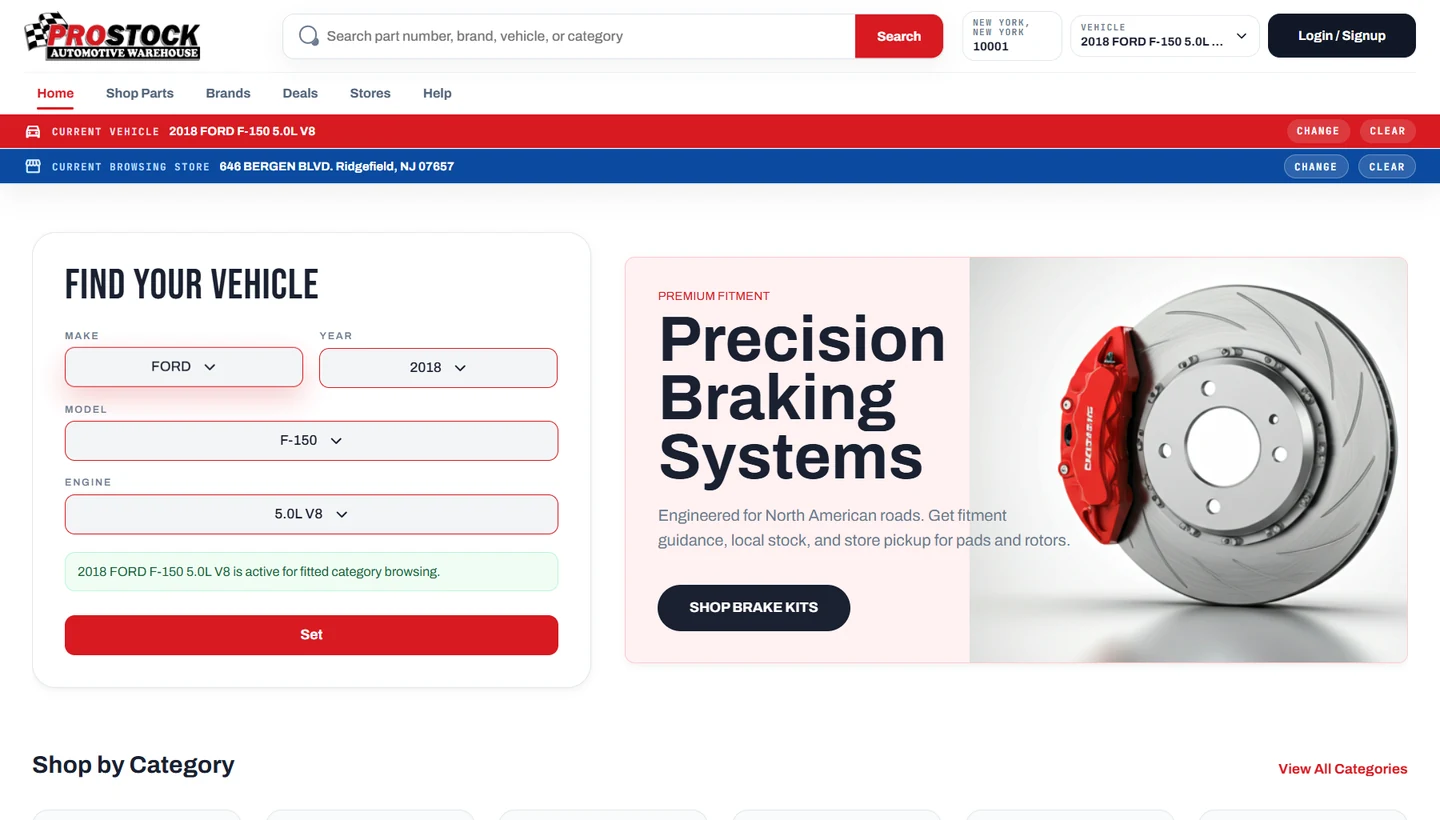
Make, year, model and engine selection narrows the journey to the vehicle the customer is working on.
Browse categories and brands, or search using a part number, product name or other catalogue details.
A ZIP code helps find a pickup location. The selected warehouse supplies the stock and pricing context.
Customer and business sign-in connects shopping to the relevant cart, saved garage, orders and pickup rules.
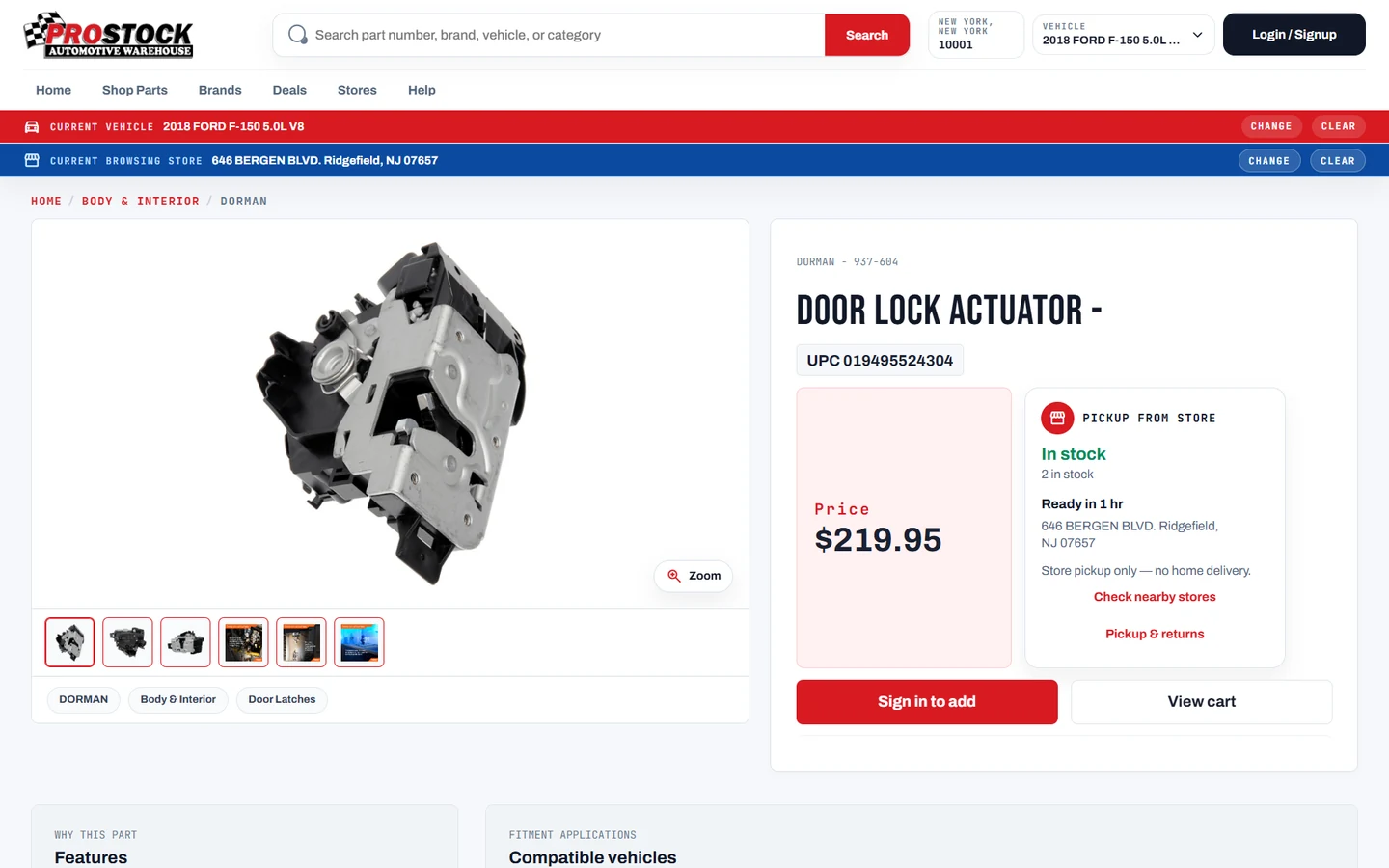
A useful product page
We bring product information and the buying decision into the same place, with clear product images and the selected store’s availability.
The admin workspace
The team can manage the catalogue and customer orders, organise stores and staff, and see where product data needs attention.
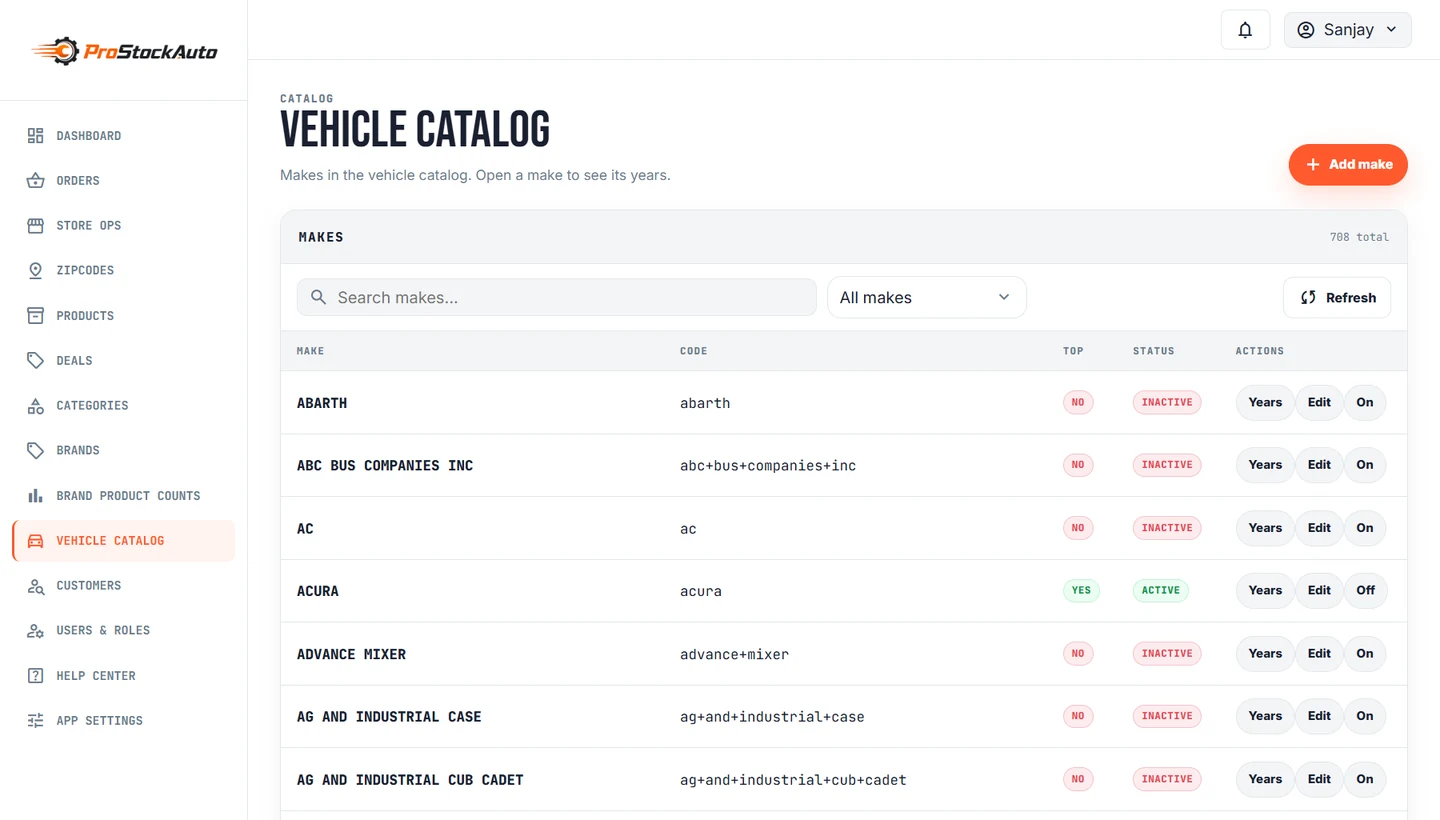
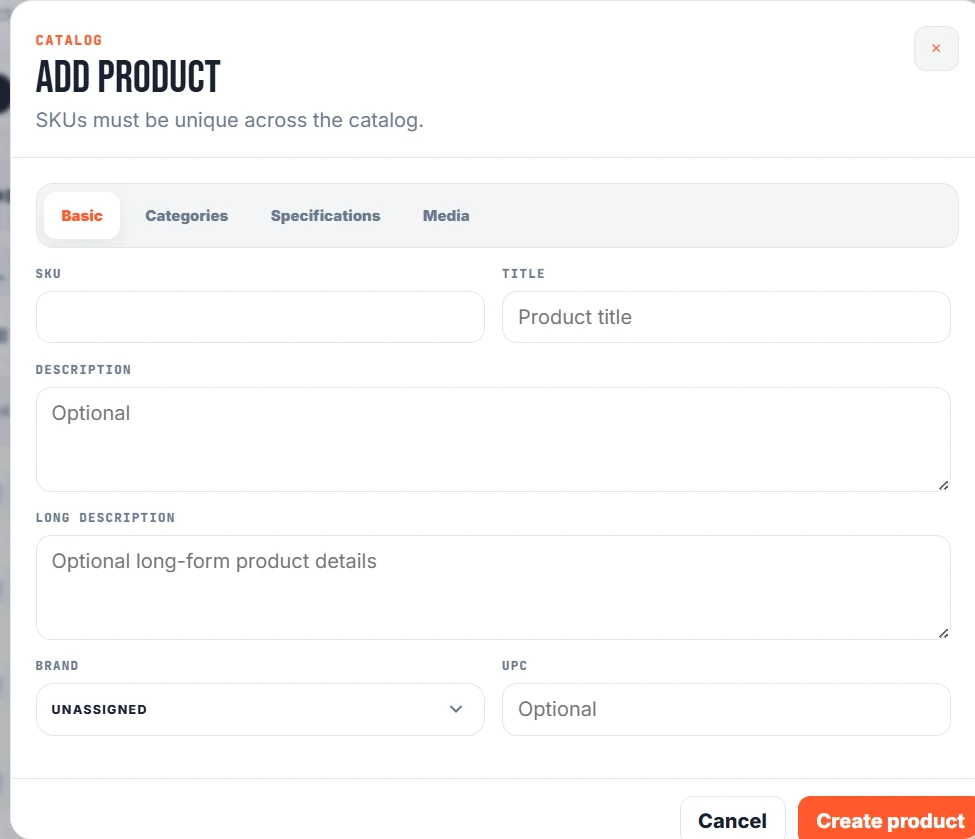
Open a section to see the workflows included.
Create and edit products with their SKU, descriptions, brand, UPC, pricing, specifications and media. Organise categories and subcategories, link products, and control whether records are published or inactive.
Maintain the make → year → model → engine hierarchy and the relationships between vehicles and products. These records power the customer’s vehicle selector and compatibility information.
Follow orders through pending, confirmed, ready for pickup and completed states, with cancellation and status history available to the team.
Manage the stores customers shop from, with location records, active/default settings and links to the corresponding back-office warehouse.
Keep customer support and staff administration in the same workspace, with controls appropriate to each account’s role.
Give the team tools to review operations and maintain the content customers see.
The automation behind the catalogue
See how a part moves from supplier data to a useful product page.
Repetitive work is automated. Unclear information stays open for review.
Product details, brands, stock files and vehicle information can arrive from different sources. We bring them into the same workflow.
Bring the details togetherKeep a record of where they came from.Add available supplier descriptions, photos and specifications so the customer can understand the part.
Product photosDescriptionSpecificationsSource recordedA clearer picture of each partOrganise each part by type and connect it to supported vehicle records. Check names, engines and duplicate information.
Product recordMissing vehicle data? Keep it visible for review.
Uncertain matches, missing details and new category suggestions go into a review queue. Missing fitment never means “fits every car”.
Apply updates that pass the checks to the catalogue. Customers can search for products while the team keeps a record of sources and changes.
Behind the scenes
Small background programs, called workers, handle different products at the same time. Each product is claimed first, so two workers do not pick up the same job.
The team can see what worked, what is missing and what needs another try.
Every result stays linked to its run, worker, product and source.
Adjust how many workers run during a supported import.
Skip a stuck item, stop a run or resume unfinished work.
Save successful source data and repair the source that failed.
Check created, updated, unchanged and failed items in reports.
Source-specific imports
Each source has its own handling, with shared progress and reporting tools. These are data sources used in the project, not partnership endorsements.
Getting the logic right
A confirmed match, a universal item and missing information are different things.
The catalogue keeps them separate so people can make a better choice.
A brake pad or alternator needs a supported link to the right vehicle and engine.
Active product-to-engine links provide the match. If a part needs a vehicle match but that link is missing, it stays as missing information, not a confirmed fit.
Some accessories can be marked as universal when their product information supports it.
Universal status needs supporting product information. An empty supplier vehicle table is not enough to say a part fits every vehicle.
Tools, cleaners and workshop supplies can be found by category or search.
These products do not need a vehicle match to be browsed. We describe them that way instead of making a claim that they fit all vehicles.
Missing or conflicting details go to the team for a closer look.
Rules and AI can help organise products, but uncertain matches and new category suggestions go through review. Existing exact vehicle links take priority over a conflicting suggestion.
No vehicle data does not mean “fits every car”.An unclear match stays open for review. It is never silently turned into a universal fit.
Checks behind every update
Reuse vehicle records, keep valid matches and add only new gallery images.
Compare a reviewed update with the latest product, so older work cannot silently overwrite newer changes.
Record sources and decisions, back up classification changes and support rollback.
From customer order to store pickup
From the customer’s basket to the pickup counter,
the website and the store team work with the same order.
SelectedStart with the selected parts and pickup store.
Staff review the order, add notes and record the next action.
The store updates the order status as pickup gets ready.
Invoices, returns and replacements stay linked to the same order.
See the order’s progress and the actions taken along the way.
The connections behind the counter
Stock, business-system information and reports help the team handle the work around it.
Give stock records the warehouse information the store needs.
Admin settings include the FTP file source, daily import schedule and timezone. Warehouse records provide the location context used by the store-facing catalogue.
See the order and its business-system connection together.
Neumonics connection settings, warehouse mappings and an order-level integration area bring the external business system into the workflow. These are configuration and workflow capabilities; this case study does not claim a tested live sync.
Review sales, returns and replacements by date or warehouse.
Filter the available report views, then export the records as a CSV file for further review. The illustration above shows the available controls, not actual sales figures.
What Sagiam brought together
A place for customers to find parts. Tools for the team to manage the work.
Automation to organise the catalogue behind both.
Products · Vehicles · Stores · Orders
Illustrated processing flow · not a live import
The technology underneath
Interfaces for shopping and daily operational work.
Next.js · ReactProducts, vehicle links, warehouses and application services.
Node.js · Express · MongoDBSupplier imports, background workers and assisted classification with review.
Worker orchestration · Ollama · Import monitoringHave a business with a complex catalogue?
Talk to Sagiam about your website, operations and the work you want to automate.
Planning a similar platform? Explore our automotive parts catalog software and ecommerce service.
Parts shoppers, store teams and catalog operators. Vehicle-fitment search, catalog, inventory, customer orders and back-office interfaces.
Vehicle-fitment search, catalog, inventory, customer orders and back-office interfaces. The case-study screens and feature explanations describe the represented product areas.
Fitment, stock and pricing come from different records; uncertain mappings need review before publication.
The represented interface brings these tasks into a connected product journey. This is a description of the software experience, not a measured increase in customers, revenue or efficiency.
Evidence: the original project screens and feature descriptions on this page. Public availability, delivery dates and measured business results are not established by interface screenshots. Approximate delivery period: not confirmed for publication. Technology and integration descriptions refer to the represented project, not guaranteed support in every new scope.