Represented scope
Buyer shopping screens, product pages and vendor-management interfaces. The case-study screens and feature explanations describe the represented product areas.

Buyer, seller and administration experiences designed as one coordinated multi-vendor marketplace system.
3
APPLICATIONS
CUSTOMER JOURNEYS
ASSISTED WORKFLOWS
ADMIN OPERATIONS

Review controls
6 ML Features
RTL Arabic
Full Localization
THE CHALLENGE
Sudan's e-commerce market was fragmented. Hundreds of sellers with no unified platform. Buyers couldn't trust online purchases. No Arabic-first experience existed. No AI. No loyalty mechanics. No data-driven seller tools.
The product brief brought buyer shopping, seller work and marketplace administration into one coordinated system.
We mapped the connected journeys before shaping the individual screens.
Each screen gives the buyer, seller or operator a clear next action within the marketplace journey.
Search, suggestions, review signals, stock alerts and draft content can support people while business rules control what is published.
The vendor and admin tools are as polished as the consumer app. Because seller success = platform success. We built three apps, not one.
MARKETPLACE FLOW
Alnilen is not just a shopping app. It is a coordinated marketplace loop where buyer confidence, vendor readiness, admin oversight, and fulfillment speed all have to line up for conversion to happen.
Search, categories, AI suggestions
Reviews, seller quality, return signals
Cart clarity, address, payment confidence
Order accepted, stock confirmed, packed
Dispatch, tracking, delivery updates
Loyalty, recommendations, repeat orders
Alnilen wins before checkout. Search quality, visual merchandising, and trust markers reduce drop-off while the buyer is still deciding.
The buyer app, vendor app, and admin panel are not separate stories. They are the same marketplace transaction seen from three operating roles.
Rewards, reorder behavior, and AI recommendations turn a single transaction into an ongoing marketplace habit rather than a one-time order.
ORDER ORCHESTRATION
A marketplace order is not complete when the user taps buy. The real work starts after purchase, when inventory, approvals, service levels, and delivery coordination must stay aligned without creating friction for the buyer.
Places order with clear expectations
Totals, promo logic, delivery promise
Order received, stock checked, prepared
Quality, fraud, SLA, exceptions
Order staged for delivery handoff
Tracking and doorstep completion
Points, offers, and future demand
Seller tools were designed to reduce the time between order receipt and action, because late confirmation kills marketplace trust as fast as poor UX.
The admin layer protects catalog quality, monitors fraud, manages promotions, and resolves marketplace exceptions before they affect conversion at scale.
A smooth post-purchase experience is what earns the next session. Fulfillment, delivery clarity, and loyalty mechanics are all part of the same retention system.
BUYER APP - THE COMPLETE JOURNEY
46 screens engineered for discovery, conversion, and retention. Here's how every touchpoint was designed with intent.


FLOW 01
The opening flow introduces the marketplace and answers three buyer questions: "Will I find useful products?" "How will I pay?" "How do returns work?" It then moves into a simple OTP login.
The Science
The onboarding keeps the explanation short and uses OTP entry so shoppers can reach the marketplace without creating another password.
FLOW 02
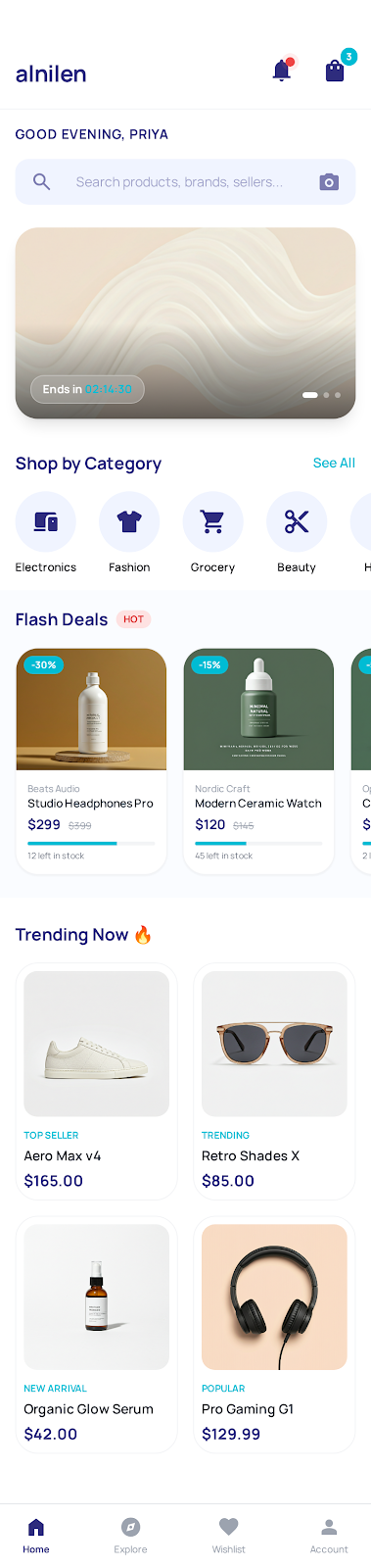
The home screen brings the shopper's greeting, featured products and time-sensitive offers into one clear browsing path.
Personalized Greeting
A personal greeting helps returning shoppers recognise their account context.
Smart Search + Visual Search
Camera-based product search gives shoppers another way to find a similar item
Flash Deals & Urgency Engine
Countdown timers + stock depletion bars drive FOMO naturally
Category-First Architecture
Electronics, Fashion, Grocery, Beauty, Home - one tap away
The Science
Search is supported with text, visual and voice entry, trending terms and personalised product suggestions.





FLOW 03
This is where browsing becomes buying. Every element on the product screen either builds confidence or creates urgency.
"12 people viewing this"
Live social proof. Creates scarcity without feeling manipulative.
"Lowest price in 30 days"
Eliminates the "should I wait for a sale?" hesitation.
Verified Seller + Trust Signals
Seller rating, response time, free delivery, 7-day returns - all visible at once.
2,341 Reviews with Photos
Review controls help shoppers compare feedback while operators can inspect suspicious activity.
The Science
Product pages combine reviews, offer information and a sticky Buy or Cart action so important details and the next step stay easy to find.
FLOW 04
The checkout keeps delivery, savings, payment and order confirmation information visible through a clear sequence.

A delivery-threshold indicator and related-item suggestions help shoppers understand the cart before checkout.

A return prompt can remind shoppers about saved items and show an approved offer where the business chooses to use one.

Progress indicator reduces anxiety. "You Save Rs. 4,250" reinforcement. Gift wrap option signals premium positioning.

The concept shows wallet, payment-provider, cash-on-delivery and bank-transfer choices. Actual providers and controls depend on the deployment.

Confirmation, loyalty information and optional sharing give the customer clear post-purchase choices.
FLOW 05
Most e-commerce apps are designed to sell. We designed Alnilen to retain. Every post-purchase screen is a re-engagement mechanism.

A delivery timeline keeps order progress and available delivery information together.

Price-change and back-in-stock alerts help shoppers follow products they care about.

Wallet balance and top-up offers are presented together for easier account management.

Bronze, Silver and Gold status makes the loyalty path and available benefits easy to understand.

The referral concept shows benefits for both participants and an optional leaderboard.

Daily gamification hook. Creates habitual app opens and emotional engagement.
VENDOR APP - THE OTHER SIDE
A marketplace is only as strong as its sellers. The vendor app isn't an afterthought - it's a full business command center as polished as the consumer experience.
The seller dashboard brings routine information and urgent actions into one clear workspace.
Real-Time Revenue Counter
Animates upward on every sale. Creates dopamine hits that keep sellers engaged and listing more products.
Urgent Actions Panel
Red border. "5 orders awaiting confirmation" creates appropriate urgency. Never lets a seller miss a sale.
Predictive Stock Alerts
"3 products low on stock" - proactive, not reactive. Prevents stockouts before they cost revenue.
Weekly Trend Line
Revenue and order trends remain visible so sellers can decide what needs attention.


New-order notifications with sound and haptic feedback. Swipe gestures for bulk processing. Status filters for quick review.


Bulk product upload, variant management and stock alerts give sellers a clearer way to maintain the catalog.


Complete financial transparency. Commission breakdown on every transaction. Weekly payouts. Sellers who feel trusted list more products.
ADMIN PANEL - THE CONTROL TOWER
The administration workspace brings catalog, sellers, orders, customers and review tasks into a connected operational view.

Admin Dashboard - Total Revenue, Orders, Active Users, Seller Approvals, Live Activity Feed - all in one view

Onboarding queue, approvals, performance scoring, communication center. Every seller lifecycle stage managed.

Approval workflows, category hierarchy, brand registry, bulk operations. Quality control at scale.

Revenue analytics, payout management, commission tracking, tax configuration. Complete financial visibility.

Real-time tracking, returns management, logistics integration. Every order from placement to delivery.

Flash sales, promo codes, banner management, push notifications. Drive conversions on demand.

Business intelligence, sales reporting, inventory health, seller performance comparisons. Data-driven decisions.
THE INTELLIGENCE LAYER
Every interaction generates data. Every data point feeds the AI. Every AI decision drives more sales. Here are the six intelligence systems powering Alnilen.
AI FEATURE 01
The recommendation workflow can use approved browsing, purchase and category signals to organise relevant product suggestions.
"Recommended for You," "Trending Now" and "Frequently Bought Together" can use approved browsing, purchase and catalog signals. Visual search lets a shopper use a product photo as another discovery route.


AI FEATURE 02
Every review is scored. Every price is monitored. The AI identifies suspicious patterns - burst activity, template-matched reviews, review farm clusters - and flags them with confidence scores.
The price and review screens surface suspicious patterns for an operator to inspect. Similar text, unusual activity and price movement can be shown as review signals rather than automatic final decisions.
AI FEATURE 03
The concept uses sales activity and stock information to flag products that may need attention.
Operators can review alerts, adjust promotion choices and decide whether replenishment work is required.

The chatbot concept supports order status, returns and product discovery, with business rules and human handoff where required.
Assisted content tools can prepare draft titles, descriptions and tags from approved product information for a seller or operator to review.
Ranking rules, synonym management, suggestions and category weighting can be tuned from the administration tools.
THE SCIENCE BEHIND EVERY PIXEL
Every color, badge, animation, and micro-interaction is backed by behavioral psychology and e-commerce conversion research.
Purchase badges, seller information and review counts give shoppers more context at key product touchpoints.
Countdowns and low-stock messages can explain time or availability limits when the underlying offer and inventory data support them.
Loyalty tiers, streak rewards, referral leaderboards and optional daily activities support an approved engagement programme.
Seller status, payment-provider information, return policy visibility and delivery terms help shoppers understand the transaction.
Empty, error and confirmation states are designed to offer a clear next action.
A personal greeting, recently viewed items, purchase-based suggestions and approved location-aware offers help organise the returning shopper's home screen.
TECHNICAL ARCHITECTURE
Buyer App
React Native
API Gateway
Node.js + WebSocket
Vendor App
React Native
AI/ML Engine
TensorFlow + NLP
Admin Panel
React.js operations workspace
Database
MongoDB + Redis
Infrastructure
AWS + CloudFront CDN
Full RTL/LTR
Arabic-first with English toggle
6 Payment Methods
Razorpay, PayPal, Stripe, COD, Wallet, Bank
Payment-provider integration
256-bit SSL, encrypted at rest
Sub-100ms Response
Redis caching + CDN delivery
SCALE THAT SPEAKS
3
Applications Built
Customer Journeys
Admin Operations
Assisted Workflows
Seller Workspace
Product catalog
Payment Choices
RTL
Full Arabic Support
Share your marketplace model, customer journey and operating rules. We will help you plan the applications and administration tools around them.
EXPERIENCE ALNILEN YOURSELF
Buyers, sellers and marketplace operators. Buyer shopping screens, product pages and vendor-management interfaces.
Buyer shopping screens, product pages and vendor-management interfaces. The case-study screens and feature explanations describe the represented product areas.
Buyer and seller tasks need different tools while referring to the same catalog and orders.
The represented interface brings these tasks into a connected product journey. This is a description of the software experience, not a measured increase in customers, revenue or efficiency.
Evidence: the original project screens and feature descriptions on this page. Public availability, delivery dates and measured business results are not established by interface screenshots. Approximate delivery period: not confirmed for publication. Technology and integration descriptions refer to the represented project, not guaranteed support in every new scope.